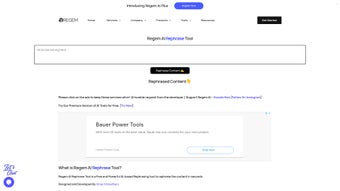

Download Regem – Free AI Rephrase Tool, Secure & Instant
Overview
Regem is a web‑based AI writing assistant that focuses on one core task: fast, reliable content rephrasing. Built on state‑of‑the‑art natural language processing models, Regem can take any block of text—whether it’s a blog paragraph, a marketing email, or a research excerpt—and instantly generate a fresh version that preserves the original meaning while delivering a new voice. Unlike many paraphrasing platforms, Regem requires no account creation, no subscription fees, and no hidden charges, making it an ideal solution for writers, marketers, educators, and anyone who needs unique text on a tight deadline.
The platform runs entirely in the browser, which means users benefit from secure, cloud‑based processing without the need to install bulky software. Whether you’re polishing SEO copy, avoiding duplicate‑content penalties, or simply looking for a creative spin on your ideas, Regem offers a convenient, free, and privacy‑first experience. Its intuitive interface, real‑time output, and AI‑driven quality control give you confidence that the rephrased content will be both grammatically correct and stylistically appropriate for your audience.
Key Features
- Instant Rephrasing: Generate alternative wording in seconds, perfect for tight publishing schedules.
- Zero‑Account Access: Start rephrasing immediately without registration or sign‑in.
- AI‑Powered Accuracy: Advanced language models maintain the original intent while providing varied sentence structures.
- Unlimited Free Use: No hidden fees, no subscription tiers—full functionality at no cost.
- Browser‑Only Operation: Works on any modern web browser, eliminating the need for downloads or installations.
- Privacy‑First Design: Text is processed securely, and no personal data is stored after the session ends.
- Multi‑Language Support: Handles English primarily, with growing support for additional languages.
- SEO‑Friendly Output: Generates unique phrasing that helps avoid duplicate‑content issues.
These features combine to make Regem a compelling option for anyone looking to boost productivity without compromising on quality. The AI engine continuously learns from a massive corpus of written material, ensuring that the rephrased output stays up‑to‑date with current linguistic trends. Because the tool runs in the cloud, updates are applied automatically, meaning you always benefit from the latest improvements without manual patches.
Installation & Usage Instructions
Getting started with Regem is remarkably simple. Since it is a web‑based service, there is no traditional installation process. Follow these steps to begin rephrasing your content:
- Open a supported browser (Chrome, Firefox, Edge, Safari) on any operating system.
- Navigate to the official Regem website (e.g., regem.ai).
- Locate the text input box on the homepage. Paste or type the text you wish to rephrase.
- Select any optional settings such as “formal tone” or “creative spin” if available.
- Click the “Rephrase Now” button. The AI will process the input and display the new version within a few seconds.
- Review the output, make any manual adjustments if needed, and copy the result to your clipboard.
The entire workflow is designed for speed and convenience. Because Regem runs entirely in the browser, you benefit from reduced latency and a secure environment where your data never leaves the session unless you choose to share it. For power users, Regem also supports bulk rephrasing via a simple text‑file upload, allowing you to process multiple paragraphs in one go. The tool’s responsive design ensures a smooth experience on desktop, tablet, and mobile devices, so you can rephrase on the go without any loss of functionality.
Regem is compatible with Windows, macOS, Linux, ChromeOS, Android, and iOS—all you need is a modern web browser with JavaScript enabled.
Pros and Cons
Pros
- Completely free with no hidden fees.
- No account or login required, saving time.
- Instant results powered by advanced AI.
- Secure, browser‑only processing protects user privacy.
- Works on any device with a modern browser.
- Easy‑to‑use interface suitable for beginners.
Cons
- Primarily optimized for English; other languages are still limited.
- Advanced tone‑control options may be limited in the free version.
- Relies on internet connectivity; offline use is not possible.
Frequently Asked Questions
Is Regem really free?
Yes, Regem offers 100 % free access to its core rephrasing engine. There are no subscription tiers or hidden charges for standard usage.
Do I need to create an account?
No. Regem is designed for instant access—just visit the website, paste your text, and click “Rephrase.”
How secure is my data?
Regem processes text in the browser and does not store any content after the session ends, ensuring your data remains private.
Can I use Regem on mobile devices?
Absolutely. The responsive web design works on Android and iOS browsers, providing the same rephrasing speed as on desktop.
What languages does Regem support?
The primary focus is English, but Regem is gradually expanding support to include major European languages.
Conclusion & Call to Action
Regem delivers on its promise of providing a fast, free, and secure AI‑driven rephrasing experience. Its no‑account requirement lowers the barrier to entry, while the browser‑only architecture guarantees that your text never lingers on a server. For content creators, marketers, and students who need to generate unique variations of existing copy without sacrificing meaning, Regem is a practical, time‑saving ally. Although the tool is currently English‑centric and requires an internet connection, its core strengths—instant output, privacy focus, and universal accessibility—make it a standout option in the crowded paraphrasing market.
If you’re ready to boost your writing efficiency and avoid duplicate‑content pitfalls, download Regem now by visiting the official website. Start rephrasing instantly, enjoy the peace of mind that comes with secure, free AI assistance, and watch your productivity soar.



.png)



